Tag: 4G Outdoor CPE

  • Best Router for RV Internet 2026: Complete Guide to Staying Connected on the Road

    Best Router for RV Internet 2026: Complete Guide to Staying Connected on the Road

    Reliable internet has become as essential to RV life as fresh water and propane. Whether you’re a full-time digital nomad running a business from a Class A motorhome, a weekend camper streaming movies in a travel trailer, or a fleet manager overseeing mobile command vehicles, your choice of router determines whether “working from the road” is sustainable or frustrating.

    Standard home routers weren’t designed for life at 65 mph — or for mounting on a roof in direct sunlight, or for operating on 12-volt DC power, or for pulling signal from a cell tower 15 miles away. RV internet demands purpose-built hardware. This guide walks through the critical factors ISPs, fleet operators, and individual RV owners should evaluate when selecting a router for mobile connectivity in 2026.

    1. Why RV Internet Demands Specialized Router Hardware

    Three environmental realities separate RV networking from residential broadband. First, mobility. An RV router connects to cellular towers that the vehicle is constantly moving relative to — signal strength, tower handoff, and band availability change continuously. Consumer routers optimized for a fixed location with stable signal perform poorly when the nearest tower shifts every few minutes.

    Second, power. RVs operate on 12V DC battery systems, not always-on AC mains. A router that draws 15–20 watts from an inverter is consuming precious amp-hours that could otherwise power refrigeration, lighting, or heating. Routers designed for RV use operate natively on 12V DC or support Power over Ethernet (PoE) with efficient power budgets of 5–12 watts.

    Third, environment. Roof-mounted outdoor units face direct sunlight (interior temperatures reaching 70°C/158°F), driving rain, road salt, dust, and vibration. Indoor units experience temperature swings from below freezing to over 40°C when the RV is parked in summer. Standard consumer routers rated for 0–40°C operation in climate-controlled rooms will fail within months under these conditions.

    For fleet operators managing multiple vehicles, these environmental factors compound. A router failure in one RV is inconvenient; router failures across a 50-vehicle fleet create an operational crisis. The upfront investment in ruggedized, automotive-grade hardware pays for itself through avoidance of truck rolls and equipment replacements.

    2. 4G vs 5G for RV Connectivity: Speed, Coverage, and Cost Tradeoffs

    The cellular generation debate is more nuanced for RV applications than for fixed-location deployments. 5G delivers dramatically higher peak speeds — 500 Mbps to 2 Gbps on mid-band spectrum — but its coverage footprint, particularly in rural areas where RV travel concentrates, remains substantially smaller than 4G LTE.

    4G LTE advantages for RV use: Near-universal coverage across highways and rural destinations; mature, power-efficient chipsets with lower heat output; significantly lower hardware cost ($80–$200 vs $250–$600 for 5G); and sufficient bandwidth (50–150 Mbps) for remote work, video conferencing, and HD streaming.

    5G advantages for RV use: Dramatically higher throughput when in coverage; lower latency (10–20ms vs 30–50ms for LTE) improves real-time applications; future-proofing as 5G coverage expands through 2027–2028; and better performance in congested areas (campgrounds, events) where 5G’s spectral efficiency handles more simultaneous users.

    The pragmatic recommendation for 2026: a 5G-capable router with 4G fallback is the optimal configuration. Devices like the Honlly HL-875H 5G CPE automatically select the best available network — connecting via 5G when in coverage and seamlessly falling back to LTE Cat 12–20 when 5G isn’t available. This approach delivers the speed of 5G where it exists without sacrificing connectivity in 4G-only areas that comprise the majority of RV travel routes.

    3. Outdoor vs Indoor Installation: Which Configuration Suits Your Rig

    FactorOutdoor Roof-Mounted UnitIndoor Router Only
    Signal ReceptionExcellent — no vehicle body attenuation, high-gain external antennas, line-of-sight to towerModerate to poor — RV body (aluminum/fiberglass) blocks 6–15 dB of signal
    Antenna Options4×4 MIMO directional or omni antennas, up to 9 dBi gainInternal antennas only, 2–3 dBi typical
    Installation ComplexityRequires roof penetration or ladder mount, cable routing through RV interiorPlace on table or shelf — zero installation
    Weather ResistanceIP65–IP67 rated, -30°C to +70°C operating rangeIndoor only, 0–40°C operating range
    PowerPoE (single Ethernet cable carries power + data), 8–15W12V DC or AC adapter
    Best ForFull-time RVers, remote workers, rural/boondocking locationsCampground use (good signal), occasional travelers, budget-conscious setups
    Cost Range$250–$600 (including antenna)$80–$300

    The outdoor unit delivers 10–20 dB better signal — a difference that translates to usable internet vs no service in fringe-coverage areas. For RVers who frequently camp in national forests, BLM land, or rural state parks, an outdoor CPE like the Honlly HL-880U 5G Outdoor CPE is effectively mandatory. The vehicle body acts as a Faraday cage, particularly aluminum-skinned RVs, and even fiberglass bodies with metal framing significantly attenuate cellular signals.

    4. Antenna Technology: MIMO, External Antennas, and Signal Amplification

    Antenna configuration is the single most impactful factor in RV router performance. Cellular modems in RV routers support 2×2 or 4×4 MIMO (Multiple Input, Multiple Output), with each additional antenna element improving both signal quality and data throughput — but only if the antennas are properly positioned and specified.

    2×2 MIMO: The baseline configuration. Two antenna paths provide diversity reception (the modem selects the better signal path) and spatial multiplexing (two simultaneous data streams). Adequate for casual browsing and SD video in moderate-signal areas. Found in entry-level and compact RV routers.

    4×4 MIMO: Four antenna paths double the spatial streams, delivering 30–50% higher throughput in good signal conditions and 2–4 dB better reception at the cell edge. For remote work requiring stable video conferencing, 4×4 MIMO is the recommended minimum. The Honlly HL-830M 5G MiFi and larger CPE devices support 4×4 MIMO on sub-6 GHz bands.

    External antenna ports: TS-9 or SMA connectors allow connecting roof-mounted high-gain antennas (6–9 dBi) that overcome vehicle-body signal loss and extend usable range from a cell tower. A directional antenna (Yagi or log-periodic) pointed at the nearest tower can add 8–12 dB of gain — extending effective range by 40–60%.

    Signal boosters vs direct antenna connection: A cellular signal booster amplifies everything (signal + noise) and adds latency. A direct antenna connection to the router’s modem port feeds clean, unamplified signal. For data applications, direct antenna connection to a 4×4 MIMO-capable router consistently outperforms booster-based approaches.

    5. Power Systems: 12V DC, PoE, and Off-Grid Operation

    Power architecture is where RV routers diverge most sharply from their residential counterparts. Key considerations:

    12V DC native operation: Every watt matters when running from batteries. A router that operates directly on 12V DC (the RV’s native electrical system) eliminates inverter conversion losses — typically 10–15% efficiency gain. Power consumption of 5–8 watts translates to roughly 0.4–0.7 amps at 12V, meaning a 100Ah battery can power the router for 5–7 days without recharging (accounting for usable capacity).

    Power over Ethernet (PoE): For roof-mounted outdoor units, PoE delivers both power and data through a single Ethernet cable. This dramatically simplifies installation — one cable penetration through the roof, no separate power wiring to route. PoE injectors can be powered from the RV’s 12V system with a DC-to-DC converter.

    Low-power modes: Some RV-optimized routers include programmable power-saving features — disabling unused Ethernet ports, reducing WiFi transmit power during overnight hours, or entering deep-sleep mode when no clients are connected. These features extend off-grid runtime by 20–30%.

    For fleet operators managing vehicles with solar + battery systems, power efficiency directly correlates to system autonomy. A fleet of 20 RVs each saving 3 watts through efficient router selection saves 1,440 watt-hours per day across the fleet — enough to power an additional refrigerator or lighting system.

    6. Key Specifications to Evaluate: IP Rating, Temperature Range, and Durability

    When comparing RV router specifications, focus on these environmental ratings:

    Ingress Protection (IP) rating: For outdoor units, IP65 is the minimum acceptable rating — dust-tight and protected against water jets from any direction. IP67 adds temporary immersion protection, valuable for RVs that cross streams or encounter standing water on roof mounts.

    Operating temperature range: Outdoor units should specify -30°C to +70°C (-22°F to +158°F) minimum. This covers winter camping in northern climates through summer desert parking. Indoor units need 0°C to +45°C — RVs parked in summer sun without air conditioning can exceed 40°C interior temperature.

    Vibration and shock: Look for IEC 60068 compliance or automotive-grade certification. Standard consumer electronics solder joints and connectors fail under the continuous vibration of road travel. Ruggedized designs use reinforced mounting points, conformal coating on PCBs, and locking connectors.

    ESD and surge protection: Roof-mounted antennas are lightning-adjacent in thunderstorms — not direct strikes, but induced surges from nearby lightning. Routers with built-in surge protection on antenna ports and Ethernet jacks (to IEC 61000-4-5) survive electrical events that destroy unprotected equipment.

    7. Installation Best Practices for Maximum Signal and Reliability

    A well-installed mid-range router outperforms a poorly installed premium unit. Key installation principles:

    Antenna placement: Roof-mounted antennas should be positioned at the highest point of the RV with a clear 360° horizon — avoid mounting behind air conditioners, satellite dishes, or storage pods that create signal shadows. For directional antennas, install with a rotator mechanism or mark alignment positions for commonly visited locations.

    Cable quality and length: Every meter of coaxial cable between the antenna and router introduces signal loss — approximately 0.3–0.5 dB per meter for quality LMR-240 cable at cellular frequencies. Keep cable runs under 5 meters whenever possible. Use LMR-400 or equivalent low-loss cable for runs exceeding 5 meters.

    Grounding: Outdoor antennas must be properly grounded to the RV chassis per NEC Article 810. This serves both lightning protection and RF performance — an ungrounded antenna can develop static charge that degrades reception and creates a shock hazard.

    WiFi placement within the RV: The router’s WiFi access point should be centrally located. RV bodies with metal framing create RF shadows; placing the router at one end of a 30-foot RV often means the opposite end has marginal WiFi coverage. A mesh-capable router or a secondary access point may be necessary for larger rigs.

    SIM orientation: Use a data plan from a carrier with the strongest coverage along your typical routes — not necessarily the carrier with the best plan at your home address. Many full-time RVers maintain SIMs from two different carriers and swap based on location. Dual-SIM routers automate this process.

    8. Top Router Recommendations by RV Type and Budget

    Full-time digital nomad (revenue-dependent on connectivity): Invest in a 5G outdoor CPE with 4×4 MIMO and external antenna support. The Honlly HL-880U combines IP67-rated outdoor hardware with 5G sub-6 GHz support, PoE power, and 4×4 MIMO — delivering enterprise-grade connectivity in a package designed for permanent outdoor installation. Pair with a high-gain directional antenna for maximum range in remote locations.

    Weekend camper and occasional traveler: A 5G-capable indoor router with external antenna ports provides a balance of performance and simplicity. The Honlly HL-875H offers WiFi 6, 5G NR with 4G fallback, and TS-9 antenna ports — place it near a window for daily use and connect an external antenna when parked in fringe-coverage areas.

    Fleet and commercial mobile operations: Ruggedized outdoor CPE with remote management (TR-069/TR-369), dual SIM failover, and GPS for asset tracking. Fleet managers need centralized visibility into connectivity status, data usage, and device health across all vehicles. Honlly’s outdoor CPE line supports the TR-369 USP protocol for cloud-based fleet management.

    Budget-conscious setup: A 4G LTE Cat 12–16 router with external antenna ports delivers solid performance at a fraction of 5G hardware cost. While 5G coverage continues expanding, LTE Cat 12 (600 Mbps theoretical, 50–120 Mbps real-world) handles video conferencing, streaming, and cloud applications for 1–3 users without issue.

    Frequently Asked Questions

    Can I use a regular home router in my RV?

    Technically yes, but with significant limitations. Consumer routers lack 12V DC power input (requiring an always-on inverter), have inadequate temperature ratings for RV environments, include no external antenna ports for roof-mounted antennas, and lack the vibration/shock tolerance needed for road travel. A home router used in an RV will typically deliver worse signal reception and fail earlier than a purpose-built mobile router.

    Do I need a 5G router for RV internet, or is 4G enough?

    For most RV users in 2026, 4G LTE still provides sufficient bandwidth (50–150 Mbps) for remote work, video calls, and streaming. However, a 5G-capable router with 4G fallback is the smarter investment — it provides faster speeds when 5G is available and automatically drops to 4G in areas without 5G coverage, which still describes most rural and highway locations.

    How do outdoor antennas improve RV internet reception?

    Roof-mounted outdoor antennas overcome two major sources of signal loss: vehicle body attenuation (6–15 dB) and low antenna position (indoor antennas near ground level). A quality outdoor antenna adds 6–9 dBi of gain and, when connected directly to the router’s modem port, delivers clean signal without the noise amplification introduced by cellular boosters. The combined benefit — overcoming body loss plus antenna gain — can be 15–25 dB, transforming a no-service location into usable internet.

    What data plan works best for an RV router?

    Data-only plans from carriers with strong rural coverage are ideal. Many RVers find that AT&T and T-Mobile offer the best combination of rural coverage and generous data caps in the US; in Europe, local prepaid data SIMs often provide better value. For international RV travel, a router with eSIM support enables downloading local data plans without swapping physical SIMs. Plan for 100–300 GB per month for full-time remote work; 30–50 GB for weekend travel.

    Can an RV router work while driving?

    Yes, and this is one area where dedicated RV routers significantly outperform phones or consumer equipment. Purpose-built mobile routers handle tower handoffs more gracefully, maintain connections through brief signal drops, and don’t interrupt service when the vehicle crosses network boundaries. However, internet quality while driving will always be variable — expect brief interruptions during tower handoffs, reduced speeds in rural areas, and complete dead zones in remote terrain. For passenger entertainment (streaming, gaming), pre-download content when possible.
  • Outdoor 4G/5G CPE Router Selection Guide 2026: IP Ratings, Antennas, and Power Options

    Outdoor 4G/5G CPE Router Selection Guide 2026: IP Ratings, Antennas, and Power Options

    Choosing the right outdoor 4G or 5G CPE router is a fundamentally different exercise from selecting indoor equipment. Outdoor units face weather extremes, distance-to-tower challenges, and installation complexity that indoor CPE simply doesn’t encounter. Whether you’re an ISP deploying rural FWA, an enterprise connecting a remote site, or an industrial operator monitoring distributed assets, the five criteria below will help you select outdoor CPE that performs reliably through years of field operation.

    1. IP Rating: The Non-Negotiable Baseline

    The Ingress Protection (IP) rating is the first filter for any outdoor CPE. Two ratings dominate the market:

    RatingDust ProtectionWater ProtectionBest For
    IP65Dust-tight (6)Water jets (5)Temperate climates, under-eave mounting
    IP67Dust-tight (6)Immersion up to 1m (7)Tropical, coastal, and flood-prone areas

    For most deployments, IP67 is the recommended minimum. Coastal installations should also verify salt spray corrosion resistance (IEC 60068-2-52) and UV-stabilized enclosures that won’t degrade under constant sun exposure.

    2. Antenna Design: Integrated vs. External

    Antenna configuration directly determines the CPE’s effective range and throughput. The choice depends on deployment conditions:

    • Integrated high-gain antennas (8–12 dBi): Simpler installation, lower cost, suitable for suburban and near-rural deployments where the tower is within 5 km.
    • External antenna ports (SMA/TS-9 connectors): Essential for rural and fringe-coverage deployments. Allows operators to attach directional panel or parabolic antennas (15–20 dBi) for connections up to 15 km from the tower.
    • 4×4 MIMO support: Non-negotiable for 5G outdoor CPE. Doubles spectral efficiency and significantly improves performance at cell edges.

    Tip: Always check if the CPE supports external antenna auto-detection. Some devices require manual firmware configuration when switching from integrated to external antennas—a major source of unnecessary truck rolls.

    3. Power Options: PoE, DC, and Battery Backup

    Outdoor CPE power flexibility can make or break a deployment:

    • Power over Ethernet (PoE 802.3af/at): The standard for outdoor CPE. A single Ethernet cable carries both data and power up to 100 meters. Look for PoE++ (802.3bt) support for higher-power 5G units.
    • DC input (12V/24V): Useful for solar-powered installations and industrial sites with existing DC infrastructure.
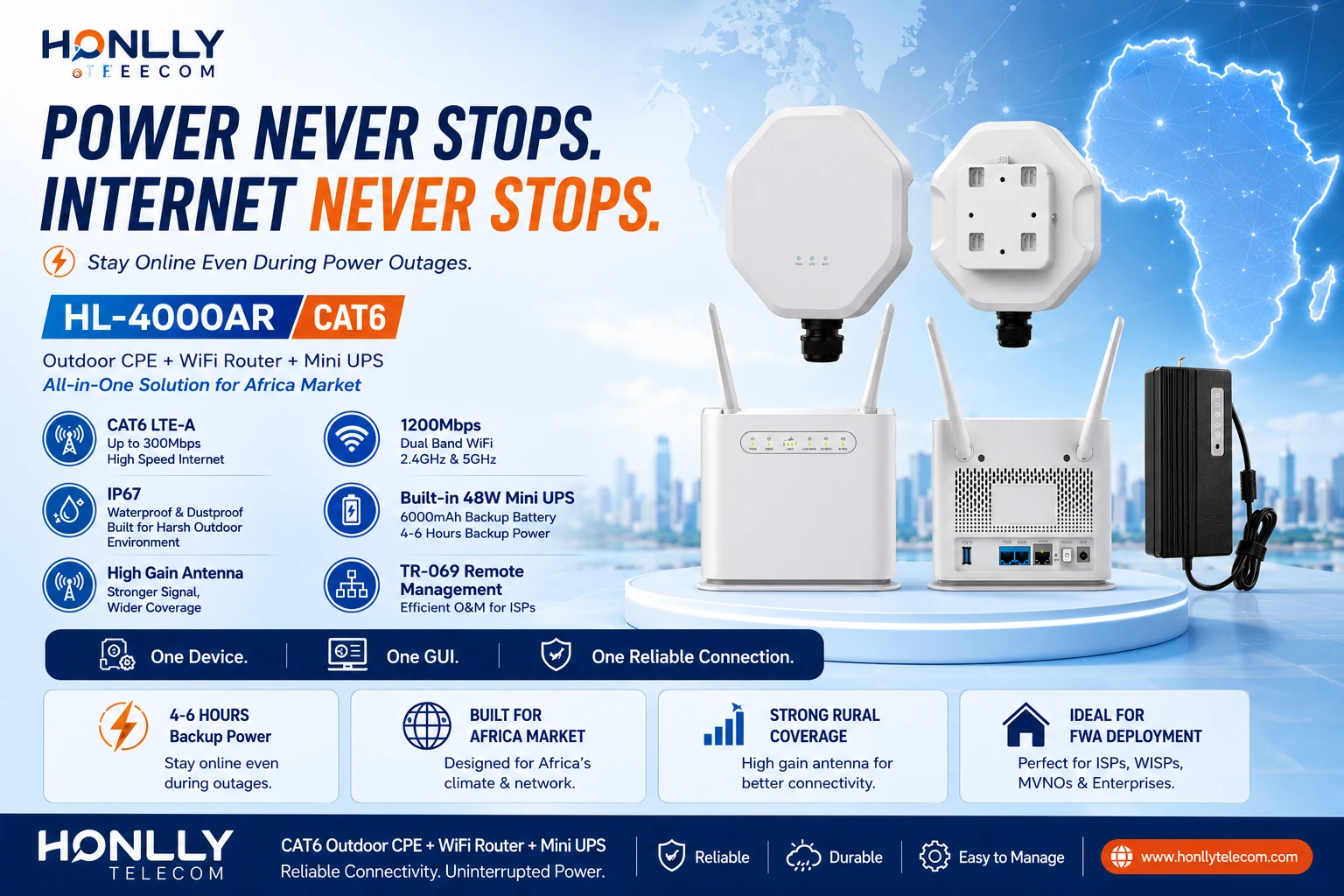
    • Battery backup / Mini UPS: Critical for areas with unstable grid power. Some outdoor CPE like the Honlly HL-4000AR integrate a 48W Mini UPS for uninterrupted operation during outages.

    4. Operating Temperature and Environmental Hardening

    Outdoor CPE must operate reliably across extreme temperature ranges. Minimum specifications to demand:

    • Operating temperature: -30°C to +60°C (industrial grade). Consumer-grade devices rated 0–40°C will fail in summer heat or winter cold.
    • Humidity: 5%–95% non-condensing.
    • Wind resistance: Enclosure and mounting bracket rated for wind speeds up to 200 km/h for pole-mounted installations.
    • Lightning/surge protection: Built-in surge protection on both Ethernet and power inputs (IEC 61000-4-5).

    5. Installation and Mounting Flexibility

    The physical installation process is where outdoor CPE TCO is won or lost. Prioritize devices that include:

    • Quick-mount pole and wall brackets — stainless steel hardware included, not sold separately.
    • Tool-less SIM access — weather-sealed SIM compartment accessible without dismounting the unit.
    • LED signal strength indicators — visible from ground level for installers to align antennas without a laptop.
    • Single-person installation design — units under 3 kg with integrated mounting arms reduce install time by 40–60%.

    Recommended Outdoor CPE by Deployment Type

    Deployment TypeRecommended ModelKey Features
    Rural FWA (5G)HL-880U 5G Outdoor CPEIP67, 4×4 MIMO, PoE, external antenna ports
    Budget CAT6 OutdoorHL-4000AR CAT6 CPEIP65, Mini UPS backup, African market optimized
    Industrial / EnterpriseHL-850M 5G OutdoorIP67, -30~60°C, dual SIM, industrial protocol support

    Frequently Asked Questions

    Q: What IP rating for outdoor CPE?
    IP67 minimum recommended. IP65 for sheltered installations. Verify salt spray resistance for coastal sites.

    Q: How far can outdoor 5G CPE reach?
    3–8 km with integrated antennas; 10–15 km with external directional antennas. Depends on frequency band and terrain.

    Q: Can outdoor CPE be PoE-powered?
    Yes. Most support PoE (802.3af) or PoE+ (802.3at). Higher-power 5G units may need PoE++ (802.3bt). Single cable up to 100m.

    Q: Do I need external antennas?
    Not for deployments within 5 km of the tower. Recommended for rural/fringe areas—adds 6–10 dB gain.

    Q: What temperature range for outdoor CPE?
    -30°C to +60°C for industrial-grade units. Consumer 0–40°C devices will fail in extreme conditions.

  • Honlly Launches HL-4000AR CAT6 Outdoor CPE with 48W Mini UPS for Africa Market

    Honlly Launches HL-4000AR CAT6 Outdoor CPE with 48W Mini UPS for Africa Market

    Honlly Telecom has released the HL-4000AR, a CAT6 outdoor CPE and indoor WiFi router system purpose-built for operators, ISPs, and distributors serving markets with unstable power infrastructure. The solution pairs an IP67-rated outdoor LTE unit with an indoor 1200Mbps dual-band WiFi router, backed by a 48W Mini UPS with a 6000mA battery — making it a practical choice for broadband deployment in Africa, Southeast Asia, and other regions where grid reliability can vary.

    The HL-4000AR addresses a specific challenge that many African operators face: delivering consistent fixed-wireless broadband to subscribers while managing remote outdoor CPE hardware and indoor gateway devices separately. Instead of requiring two independent management platforms, Honlly designed the HL-4000AR so both the outdoor unit and the indoor router are managed through a single unified GUI. For operators, this means fewer support tickets, simplified after-sales service, and lower field-maintenance costs.

    Why a Built-in Backup Battery Matters for African Deployments

    In many African markets, power availability can be unpredictable — especially in peri-urban, rural, and semi-rural areas where FWA (Fixed Wireless Access) is often the most viable broadband option. A traditional CPE installation loses connectivity the moment grid power drops, even when the base station signal remains strong.

    The HL-4000AR includes a 48W Mini UPS with a 6000mA lithium battery integrated into the indoor router unit. When mains power fails, the system automatically switches to battery power, keeping both the outdoor CPE and the indoor WiFi network running. Depending on usage patterns, the battery provides several hours of autonomous operation — enough to cover typical African power outage durations. For the end subscriber, this means uninterrupted internet. For the operator, it means fewer complaints, reduced churn, and a service that feels more reliable than competing offerings.

    All-in-One Architecture: Outdoor CPE + Indoor Router + UPS

    The HL-4000AR is a complete subscriber-premises solution in one SKU:

    Outdoor CPE Unit (ODU)

    • CAT6 LTE with carrier aggregation and 2×2 MIMO
    • Chipset: ASR 1828 supporting 3GPP Release 10
    • Frequency bands: LTE-FDD B1/B3/B5/B7/B8/B20/B28, LTE-TDD B38/B40/B41, plus WCDMA B1/B8 and 2G fallback
    • IP67 weatherproof enclosure (150mm × 182mm × 50mm, under 1 kg)
    • Operating temperature: −40°C to 55°C
    • Powered via Gigabit PoE from the indoor router

    Indoor PoE Router Unit

    • Dual-band 802.11b/g/n/ac WiFi with 2×2 MIMO (up to 1200Mbps PHY rate)
    • 32 concurrent WiFi users
    • 2 × Gigabit LAN ports, 1 × Gigabit PoE WAN port, 1 × RJ11 voice port
    • Built-in 48W Mini UPS with 6000mA backup battery
    • Compact desktop form factor: 180mm × 48mm × 150mm, under 300g
    • Operating temperature: −15°C to 55°C

    Single GUI Management

    • Both ODU and router are configured, monitored, and updated through one web interface
    • Standard TR-069 support for centralized ACS-based remote management
    • FTP and HTTP OTA firmware upgrade for both devices
    • USIM/PLMN locking support for operator-branded deployments

    Simplified After-Sales for Operators

    Managing customer-premises equipment is one of the largest operational expenses for broadband operators. When an outdoor CPE and an indoor router come from different vendors, field technicians and call-center staff must navigate separate interfaces, separate firmware versions, and separate diagnostic procedures.

    Honlly designed the HL-4000AR so both devices appear as one logical system inside a single management GUI. A support agent can check the outdoor signal quality, the indoor WiFi status, the LAN port activity, and the battery level from one screen. Firmware updates can be pushed to both units through one TR-069 session. This unified approach reduces average handling time per support case and makes it practical for operators to offer remote troubleshooting without dispatching a technician.

    Key Technical Specifications

    Feature Specification
    LTE Category CAT6 with Carrier Aggregation
    Chipset ASR 1828 (3GPP Release 10)
    LTE Bands (FDD) B1 / B3 / B5 / B7 / B8 / B20 / B28
    LTE Bands (TDD) B38 / B40 / B41
    3G / 2G Fallback WCDMA B1/B8, GSM 900/1800MHz
    ODU Protection IP67, −40°C to 55°C
    Router WiFi 802.11b/g/n/ac, 2×2 MIMO, up to 1200Mbps
    WiFi Users Up to 32 concurrent
    LAN Ports 2 × Gigabit RJ45
    Voice Port 1 × RJ11 (VoIP optional)
    Backup Battery 48W Mini UPS, 6000mA
    Power Consumption Under 18W total
    Management Single GUI, TR-069, HTTP/HTTPS, Telnet, CLI
    VPN Support PPTP, L2TP, GRE, IPsec pass-through
    Network Modes Router and L3 bridge, DHCP server, IPv4/IPv6, multiple PDN

    Built for the African Operating Environment

    The outdoor unit’s IP67 ingress protection and −40°C to 55°C operating range ensure it can handle the full spectrum of African climate conditions — from coastal humidity in West Africa to high-temperature environments in the Sahel and East African highlands. The compact, lightweight design supports both wall mounting and window mounting, reducing installation complexity for operators deploying at scale.

    The device also covers the LTE bands most commonly used by African mobile network operators. With support for B1 (2100MHz), B3 (1800MHz), B5 (850MHz), B7 (2600MHz), B8 (900MHz), B20 (800MHz), and B28 (700MHz), the HL-4000AR is compatible with the majority of 4G LTE networks across the continent. B28 (700MHz) coverage is particularly important for rural and wide-area deployments, where lower frequencies provide better propagation and indoor penetration.

    Operator-Ready Software Features

    Beyond the hardware integration, the HL-4000AR includes software capabilities that simplify large-scale CPE fleet management:

    • TR-069 ACS Integration: Operators can remotely provision, configure, monitor, and upgrade thousands of devices from a central management platform.
    • VPN Tunneling: Built-in L2TP and GRE client support plus PPTP and IPsec pass-through enable secure enterprise and business-grade connectivity.
    • VoIP Ready: Optional SIP 2.0 VoIP with G.711, G.729, and G.722 codec support, plus caller ID, call waiting, call forwarding, and three-way calling — useful for operators bundling voice with data.
    • Multiple PDN Support: Enables separate APN profiles for different services, allowing operators to offer tiered data plans or separate management and user traffic.
    • Firewall and Access Control: DMZ, virtual server, IP/port forwarding, application firewall, and LAN device access control provide baseline security for subscriber networks.

    Deployment Scenarios

    The HL-4000AR is designed for several common African broadband deployment models:

    • Rural and Peri-Urban FWA: Deploy where fixed-line infrastructure is limited or absent. The backup battery keeps subscribers online through power fluctuations.
    • SME Broadband Bundles: Combine high-speed CAT6 LTE with dual Gigabit LAN, WiFi for 32 users, and optional VoIP for small offices and retail businesses.
    • Operator-Branded CPE Programs: Customize housing color, logo, packaging, firmware UI, SSID defaults, and language for branded service offerings.
    • Education and Health Connectivity: Provide reliable internet for schools, clinics, and community centers in off-grid or weak-grid locations where the battery backup adds meaningful uptime.

    Availability and Customization

    The HL-4000AR is available now for operator trials, sample evaluation, and volume orders. Honlly supports OEM and ODM customization including housing color, logo printing, packaging design, firmware interface language, default SSID configuration, and operator-specific band locking and PLMN settings.

    For more information about the HL-4000AR CAT6 Outdoor CPE with 48W Mini UPS, including pricing, samples, technical documentation, or distributor cooperation, please contact Honlly Telecom.


    Frequently Asked Questions

    What makes the HL-4000AR different from a standard CAT6 outdoor CPE?

    The HL-4000AR combines three components that operators typically source separately — an outdoor CAT6 CPE, an indoor WiFi router, and a UPS backup battery — into one integrated solution with a single management GUI. This reduces procurement complexity, simplifies installation, and makes remote after-sales support more efficient.

    How long does the 6000mA backup battery last during a power outage?

    Battery runtime depends on usage — the system draws under 18W total. Under typical subscriber usage (WiFi active, moderate data throughput), the 6000mA / 48W Mini UPS provides several hours of autonomous operation, sufficient to cover the majority of power outage durations common in African markets.

    Can the HL-4000AR work with any African mobile network?

    The HL-4000AR supports LTE-FDD bands B1/B3/B5/B7/B8/B20/B28 and LTE-TDD bands B38/B40/B41, covering the primary 4G frequency bands used by mobile operators across Africa. It also includes 3G and 2G fallback for networks still operating legacy infrastructure.

    Does the operator need separate management tools for the outdoor and indoor units?

    No. Both the outdoor CPE and the indoor router are managed through a single web GUI. For large-scale deployments, TR-069 ACS integration enables centralized remote management of both devices as one logical system.

    Is the HL-4000AR suitable for voice services?

    Yes. The indoor router includes an RJ11 port and supports optional SIP 2.0 VoIP with G.711, G.729, and G.722 codecs, plus standard telephony features including caller ID, call waiting, call forwarding, and three-way calling.

    Frequently Asked Questions

    Q1: What makes the HL-4000AR suitable for the African market?

    The HL-4000AR features a built-in 48W mini UPS for 4–6 hours of backup power during outages, CAT6 LTE-A for up to 300 Mbps, IP65 outdoor rating, high-gain MIMO antennas for rural coverage, and wide-temperature operation (-30 to +55 degrees Celsius)—specifically designed for Africa’s infrastructure challenges.

    Q2: How does the built-in UPS benefit operators deploying CPE in Africa?

    The integrated backup battery eliminates the need for external UPS units, reduces installation complexity, ensures continuous connectivity during frequent power outages, and lowers total deployment cost. It keeps critical services (mobile money, health, education) online during grid failures.

    Q3: What other markets can benefit from outdoor CPE with UPS like the HL-4000AR?

    Southeast Asian islands (Philippines, Indonesia), rural Latin America, remote mining/agricultural sites in Australia, emergency response/disaster recovery deployments, and off-grid locations worldwide with intermittent power supply.